Holiday Crop | Full-Page Photo
Tags:Tis the season of paper crafting everything merry and bright! For some holiday fun, we're issuing ten festive challenges based on Creative Team projects. We hope you'll play along!
This challenge comes from CT member Marie Lottermoser based on her project, Snow Day.
This is my first time making a Christmas page in my Traveler's Notebook. We were lucky enough to have a white Christmas so I printed a full-size photo of my son playing in the snow on the one side. On the other page, I took a circle embellishment from the Christmas Ephemera Pack by Jasmine Jones and placed puffy alpha stickers around it that spelled out "Snow Day." I added one of the Christmas Veneer Tags under it because I love the color and dimension it added to my page.
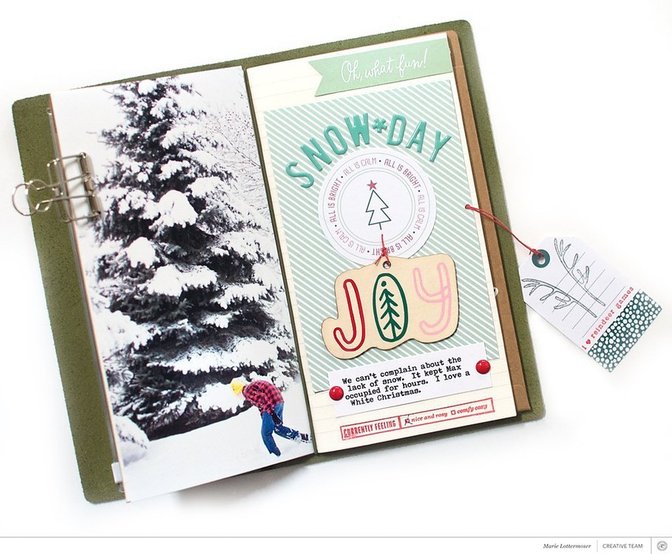
For this challenge, we'd love to see you use a full-page (or extra large) photo! Using large photos can really add a wow element to your projects, whether it be in a notebook, scrapbook page, or pocket page.
Let's see how you use a full-size photo for a chance to win a $10 GC to the Studio Calico shop! Your project can be holiday or non-holiday related. When you complete this challenge, upload it to the member gallery and leave a link to your project in the comments below. See all of our holiday challenges here.


Comments
Sign in or sign up to comment.
8 comments
What a fun challenge! I haven't used a full-page photo but an extra large one on this layout.
https://www.studiocalico.com/galleries/208227-furry-best-friend
Thanks for the challenge!
Replies to JaneD
Sign in or sign up to reply.
Here is mine (size of layout is 6x8):
https://www.studiocalico.com/galleries/208288-celebrating-with-friends
Replies to jenjeb
Sign in or sign up to reply.
Here is my take on this challenge. I have always struggled with finishing off the last page of my first PL album for the year and the first page of my second PL album for the year. This challenge has inspired me to think beyond my norm and I am so happy with the results!! https://www.studiocalico.com/galleries/208290-in-with-the-new
Replies to meldarcy
Sign in or sign up to reply.
Timing is everything. The first half of this year was spent in our old house, we had been there for 12 years - with very few photos of the front of the house itself (I ended up sourcing this photo from Google Street View from a couple of years back). We moved in the first week of July, right as our family PL album changed over so this layout marks the end of an era for our family. Love the flow that these two layouts bring to the albums and tie them together. https://www.studiocalico.com/galleries/208289-out-with-the-old
Replies to meldarcy
Sign in or sign up to reply.
I did not love the print quality or color of my extra large photo, so I ended up using it as background paper.
https://www.studiocalico.com/galleries/208326-you-me
Replies to tebbe_bear
Sign in or sign up to reply.
These challenges have been a lot fun. Inspired me to start some projects that I have been wanting to work on.
https://www.studiocalico.com/galleries/208344-full-photo-page
Replies to stephaniemc76
Sign in or sign up to reply.
Here’s my take https://www.studiocalico.com/galleries/208371-brave
Replies to Bellaa75
Sign in or sign up to reply.
It was my first attempt at printing a full sized photo for my TN. It came out small so it’s my almost full sized photo layout, but it was intended to be. LOL
https://www.studiocalico.com/galleries/208383-say-what
Replies to terriblygreat
Sign in or sign up to reply.